

Chart of Accounts (COA) Redesign Project
Modernizing Gavilan College’s Financial Foundation
Welcome!
This page provides information about Gavilan College’s Chart of Accounts (COA) Redesign Project, including background, purpose, and required resources. As the project progresses, additional materials and FAQs will be added here to help the campus community understand the changes and prepare for implementation.
Gavilan College has launched a multi-year Chart of Accounts (COA) Redesign Project to modernize how we record, organize, and report financial transactions across the District. This redesign aligns with the California Community Colleges Budget and Accounting Manual (BAM) and statewide best practices to ensure our financial structure is clear, compliant, and consistent with the systemwide framework.
Led by the Office of Administrative Services, this initiative is a key part of our ongoing efforts to improve consistency, transparency, and efficiency across all departments. It is being carried out in close collaboration with Human Resources (HR), under the leadership of the Vice President of Human Resources, and Information Technology (IT), led by the Chief Technology Officer. Because payroll and position accounting make up a significant portion of the College’s expenditures, and the new structure requires extensive Banner system configuration, alignment between Finance, HR, and IT is essential. Together, these teams are ensuring that financial, human resources, and technical systems are fully integrated to support accurate budgeting, reporting, and long-term sustainability.
The project began in 2024-2025 with foundational work to simplify and clean up existing account structures. During that year, the District:
- Reduced the number of account codes from 193 to 87, aligning with the California Community Colleges Budget and Accounting Manual (BAM).
- Shared the updated account codes and their descriptions with the campus community in Fall 2024 to promote understanding and consistent use.
- Assigned some Restricted General funding sources a unique Fund ID and each affected department a unique Organization ID, laying the groundwork for the transition to a fully redesigned Chart of Accounts.
Now in the current phase, the District is expanding this framework to implement the full FOAP structure—Fund, Organization, Account, and Program—within the Banner system. This will create a more flexible, accurate, and transparent financial foundation to support future integrations, including Questica Budget, and enhance districtwide reporting capabilities.
As Gavilan College continues to grow and modernize its financial systems, updating the Chart of Accounts (COA) has become essential. The current structure was created many years ago and no longer meets the District’s operational, reporting, or compliance needs. Over time, the existing system has become difficult to maintain, and inconsistencies have developed across departments and funds.
Historically, Gavilan used only two components of the Banner FOAP structure — Organization (O) and Account (A). Because the Organization code was used to represent both the department and the funding source, it became challenging to produce accurate financial reports and isolate information by fund or program. This limited structure made financial analysis and transparency more difficult.
The redesigned COA introduces the full FOAP framework — Fund, Organization, Account, and Program — establishing a clear, consistent, and scalable foundation for managing all financial transactions across the District.
Key Benefits
- Improves Clarity and Consistency – Each element of the FOAP serves a distinct purpose, eliminating overlaps and confusion while aligning with the California Community Colleges Chancellor’s Office and the Budget and Accounting Manual.
- Enhances Reporting and Transparency – The new structure will improve the accuracy and flexibility of financial reports, helping administrators, managers, and departments make data-driven decisions.
- Integrates with New Systems – The redesigned COA supports upcoming implementations such as Euna (Questica) Budget and strengthens integration with Banner HR, Payroll, Student, and Financial Aid modules.
- Supports Institutional Growth – As Gavilan expands, particularly with the new Hollister campus - the new structure will better support multi-campus operations, program-level tracking, and grant management.
- Streamlines Processes and Reduces Errors – Simplified account coding will make data entry easier, reduce manual workarounds and repetition, and minimize errors in financial transactions and reports.
- Provides Future-Ready Framework - Designed in collaboration with Ellucian Advisory consultants, the new COA follows higher education best practices and positions Gavilan to adapt to ever-evolving fiscal, reporting, and technology requirements.
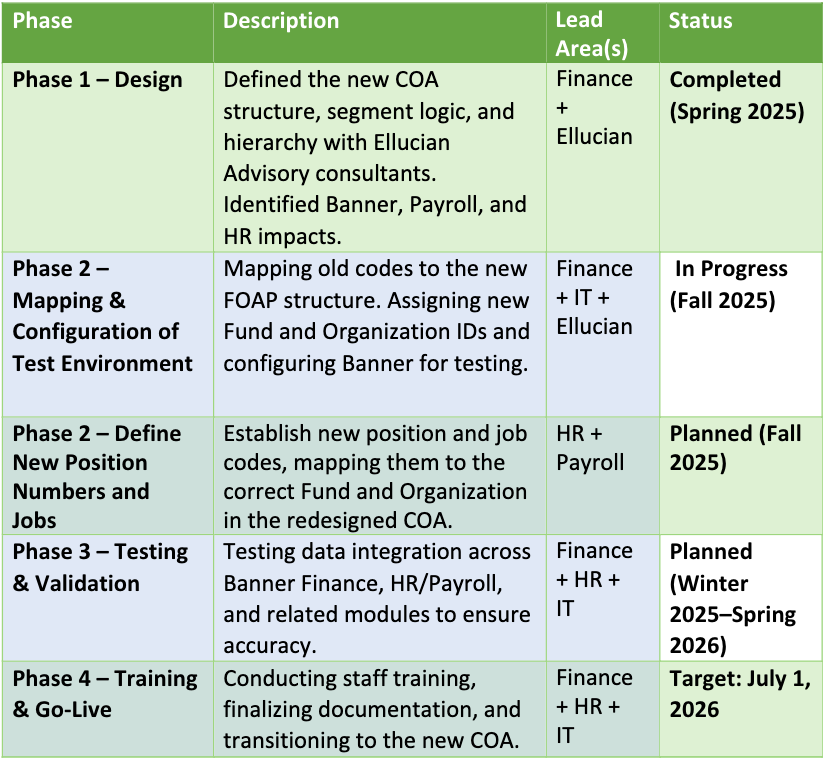

Over the coming months, the project team will:
- Finalize the mapping of old account structures to the new FOAP framework.
- Conduct system testing to ensure accuracy across Banner modules.
- Provide training sessions and produce reference guides for all impacted departments.
- Roll out new reporting templates and budget tools aligned with the updated COA.
The campus community will receive regular updates through email announcements, campus meetings, and this webpage. Managers and fiscal users will also be invited to participate in training sessions prior to go-live.
Resources & Related Links
- Understanding the Chart of Accounts (COA) — Learn how FOAP codes work and view examples.
- COA Crosswalk: Old to New Structure
- Implementation Timeline & Key Milestones
- Frequently Asked Questions (FAQ)
- Euna Questica Budget Implementation
- Training Calendar (Spring 2026 – coming soon)
Contact Information
Vice President of Administrative Services – Marilyn Morikang mmorikang@gavilan.edu
Vice President of Human Resources – Lucy Alvarez lalvarez@gavilan.edu
Chief Technology Officer – Kyle Billups – kbillups@gavilan.edu
Director of Fiscal Services – Michelle Anaya – manaya@gavilan.edu
A Guide to FOAP and Financial Coding at Gavilan College
The Chart of Accounts (COA) is the foundation of the College’s financial system. It provides a structured and consistent way to record, organize, and report every financial transaction across the District.
At Gavilan College, the COA is managed through our Banner enterprise system, which uses an alpha-numeric coding structure known as FOAP — representing Fund, Organization, Account, and Program. Each element of the FOAP identifies key details about a transaction, such as the funding source, department, expense type, and purpose.
Gavilan only uses the FOAP components of the Banner structure (and not the optional Activity or Location segments), allowing for a simpler yet effective framework that meets our operational, reporting and compliance needs.
Together, these codes ensure that every dollar spent or received can be accurately tracked, categorized, and reported — supporting transparent and efficient financial management.
Example: How a FOAP Code Works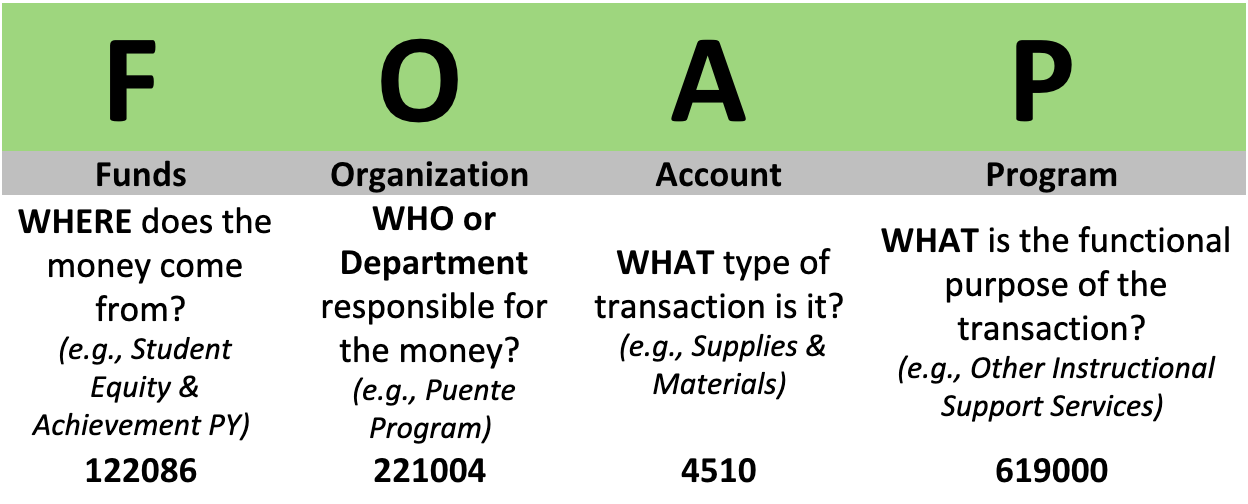
Full FOAP Example:
122086-221004-4510-619000
This code represents a supplies purchase made by the Puente Program using Prior Year Student Equity & Achievement funds for other instructional support services.
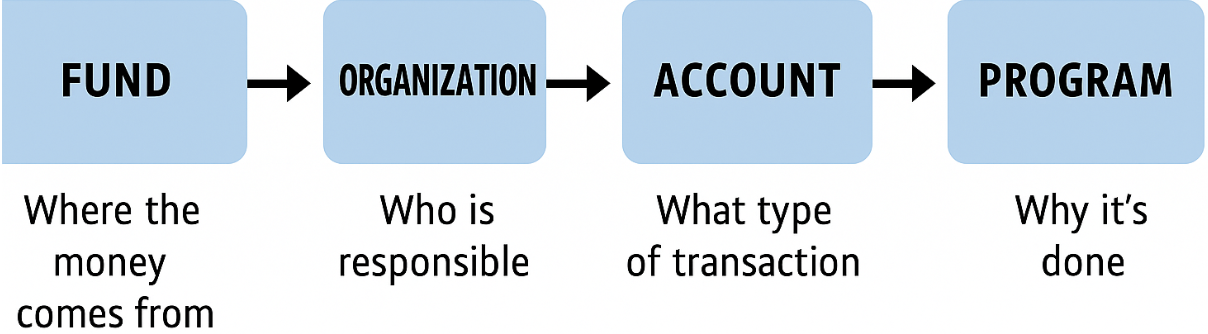
Quick Reference
- Fund: Identifies the source of the money (e.g., Unrestricted, Categorical, Grant). List of Funds
- Organization: Identifies the department or area responsible for the transaction. List of Organization IDs
- Account: Identifies the type of expense or revenue (e.g., Salaries, Supplies, Services). List of Salary Accounts List of Operating expense Accounts List of Revenue Accounts.
- Program: Identifies the functional purpose (e.g., Instruction, Student Services, Administrative Support).
What is the Chart of Accounts?
The Chart of Accounts, or COA, is a system of tracking every financial transaction that occurs at the College. Our Banner system currently catalogs these transactions using an alpha-numeric sequence called a FOAP-, which can then be used to deliver streamlined financial reports.
Why are we updating the Chart of Accounts?
What is a FOAP?
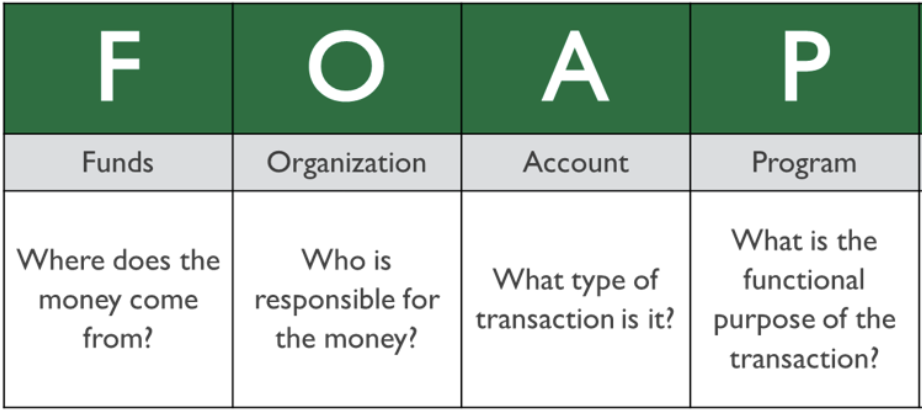
FOAP (foep) is an acronym used to describe each segment of a financial transaction in the Banner system. This chart outlines what each letter represents. For specific information on FOAP, please watch the video below:
Who can I contact if I have questions?
You can email accounting@gavilan.edu, where we will answer your question, or direct you to the person who can help you further.
What is Fund?
Fund=Where does the Money Come From? • The “F”, in FOAP, stands for “Fund” and identifies the source of the revenue received. (the “Where?”) • Funds are used to track revenue and expenses related to a specific source of revenues. • Funds also track assets and liabilities, such as cash balances and accounts payable. • Each Fund can be associated with multiple Orgs. The largest of these funds is the 100000 Unrestricted General Fund. This fund is the primary fund used by most financial managers.
What is Organization?
Organization=Who is Responsible? • The “O” in FOAP identifies the Organization (Org) responsible for managing the money (the “Who?”) It follows a structure very similar to the District’s organizational chart • Orgs only track revenue and expenses • Orgs do not track Balance Sheet accounts such as Cash, Accounts Receivable, Accounts Payable or any other asset or liability. • One Org can be associated with many different Funds.
What is Account?
Account=What is the Transaction For? • The “A” in FOAP stands for Account and identifies what the specific type of transaction. (the “What?”) • Revenues: Tuition, student fees, ticket sales, interest income, etc. • Expenses: Personnel costs, supplies, postage, travel, overhead charges, etc. • Transfers: Transfers in and Transfers out • Balance sheet account codes include: • Assets: Cash, Accounts Receivable, Inventory, etc. • Liabilities: Accounts Payable, Accrued Liabilities, etc. • Net Assets: Total of assets minus liabilities, formerly called Fund Balance.
What is Program
Program=How Do We Compare? • The “P”, in FOAP, stands for Program and identifies the functional purpose of the transaction using the same categories as other Districts. (the “How” do we compare?) • Program codes follow a standardized system of comparable functional categories that are required by the California Community College’s Chancellor’s Office.